
⚠️ Affiliate Disclosure: This article contains “Blip AI review” affiliate links to AppSumo. If you purchase through our links, we may earn a small commission at no extra cost to you. We only recommend tools we genuinely believe provide value. Read our full Affiliate Disclaimer. 🙏
⚡ Quick Verdict: Blip AI Review 2026
| 5.0 ★★★★★ / 5 — AppSumo Rating 🚀 AppSumo Launchpad | Blip AI is an AI-powered voice dictation tool for Mac and Windows. Press the Fn key (or a custom hotkey) and speak naturally. Release it, and perfectly formatted text appears instantly at your cursor. It removes filler words automatically. Works in every app: Gmail, Slack, Notion, ChatGPT, VS Code, WhatsApp, Google Docs, and more. Hey, Blip action mode lets you draft entire emails and messages from a single voice command. 99+ languages auto-detected. HIPAA-compliant. Trusted by 8,500+ professionals. 5.0/5 from 30 verified AppSumo buyers. AppSumo Launchpad pick. 60-day money-back guarantee. |
| ⌨️ How It Works: Press Fn → Speak → Release → Text appears instantly | 🏪 Platform: AppSumo Launchpad | 60-day refund | 10% Off |
| 🎤 Hey Blip: Draft full emails & messages by natural language command | 🌍 Languages: 99+ auto-detected, no manual switching |
| ✨ AI Polish: Filler-word removal, grammar, tone, formatting — auto | 🔒 Privacy: HIPAA-compliant, no stored transcriptions |
| 💻 Platforms: macOS + Windows (iOS coming soon) | 🆚 Alternative to: Wispr Flow, Dragon Dictate, Willow Voice |
👉 View Blip AI Lifetime Deal on AppSumo → 10% Off New Users
AppSumo Launchpad | One-Time Payment | 60-Day Money-Back Guarantee
Blip AI Review 2026: Stop Typing. Just Speak.
There is a version of your workday that is measurably slower than it needs to be — and it involves your fingers.
Think about how much of what you type every day is fundamentally spoken thought. The reply to an email. The Slack message explaining a decision. The ChatGPT prompt you are trying to construct. The comment in your code. None of these originates as text in your head. They start as ideas, fully formed, clear, and complete. Then you spend time turning them into keystrokes, one character at a time.
The friction is not in having the thought. The friction is in the mechanical step from thought to text. That step is where many knowledge workers lose hours each week, often without noticing it.
Blip AI’s premise is direct: remove that translation layer entirely. Press a hotkey, speak, release. Your words — cleaned of filler, corrected for grammar, formatted for context — appear instantly wherever your cursor is. Not in a transcription window. Not in a clipboard. Right there, in Gmail, in Slack, in VS Code, in ChatGPT, in whatever you are currently working in.
The key feature that sets Blip AI apart from basic dictation tools is Hey Blip action mode. Instead of dictating words, you give a clear instruction. You might say, “Hey Blip, draft a follow-up to my client.” “Thank her for yesterday’s meeting.” “Keep it brief and warm.” Then a polished, ready-to-send email appears. It is not a transcription of your sentence. It is a real email.
With 8,500+ active users, a perfect 5.0/5 score from 30 AppSumo reviews, and an AppSumo Launchpad badge, I will explain what it does. I will also cover whether it is worth adding to your stack.
“Blip AI has completely changed how I vibe code. I can dictate big prompts while thinking. It’s a game changer.” — Verified Blip AI user, developer
👉 Related: Unmixr AI Review 2026 — Best Text-to-Speech & Audio Tool on AppSumo
🎁 New to AppSumo? Get 10% Off Your First Purchase!
Sign up with a new email → get 10% discount on any lifetime deal.
Thousands of tools from $19 once.
🛍️ Sign Up & Get 10% Off AppSumo →
✅ New accounts only | ✅ Instant discount | ✅ Lifetime access
📌 What Is Blip AI?
Blip AI is a lightweight desktop application for macOS and Windows that intercepts the gap between your voice and your keyboard. The team built it because they were frustrated with every existing solution. Built-in Mac and Windows dictation felt robotic and inaccurate. It also made you speak punctuation out loud. Tools like Otter.ai were designed for transcription, not real-time typing. And premium dictation software like Dragon was expensive and complex to set up.
Blip sits quietly in your system tray. When you press the hotkey, it activates. When you release, it delivers. The entire model follows a single design principle. The output should show up where you already work. It should not appear in a separate window. You should not need to copy it.
The GPT-powered intelligence layer is what separates it from older dictation tools. Blip does not just transcribe — it understands. It knows you said “um, so basically what I’m trying to say is…” and delivers “I wanted to clarify…” instead. It knows you are typing in a Slack channel and keeps the output brief. It knows you are composing a formal email to a client and adjusts accordingly.
💡 The speed math: The average person types at 40–80 words per minute and speaks at 130–150 words per minute. In pure output terms, Blip AI makes you 2–4x faster on text-heavy tasks. For a developer writing AI prompts, that difference adds up each day. For a sales rep responding to leads, it adds up each day. For a remote worker managing a full inbox, it adds up each day.
🎬 Watch Blip AI in Action
See the hotkey workflow, Hey Blip action mode, and multi-app dictation working in real time before you dive into the feature details:
🎬 Official Blip AI demo — hotkey activation, Hey Blip action mode, filler-word removal, and cross-app text injection walkthrough.
📸 Inside Blip AI – What You Actually See
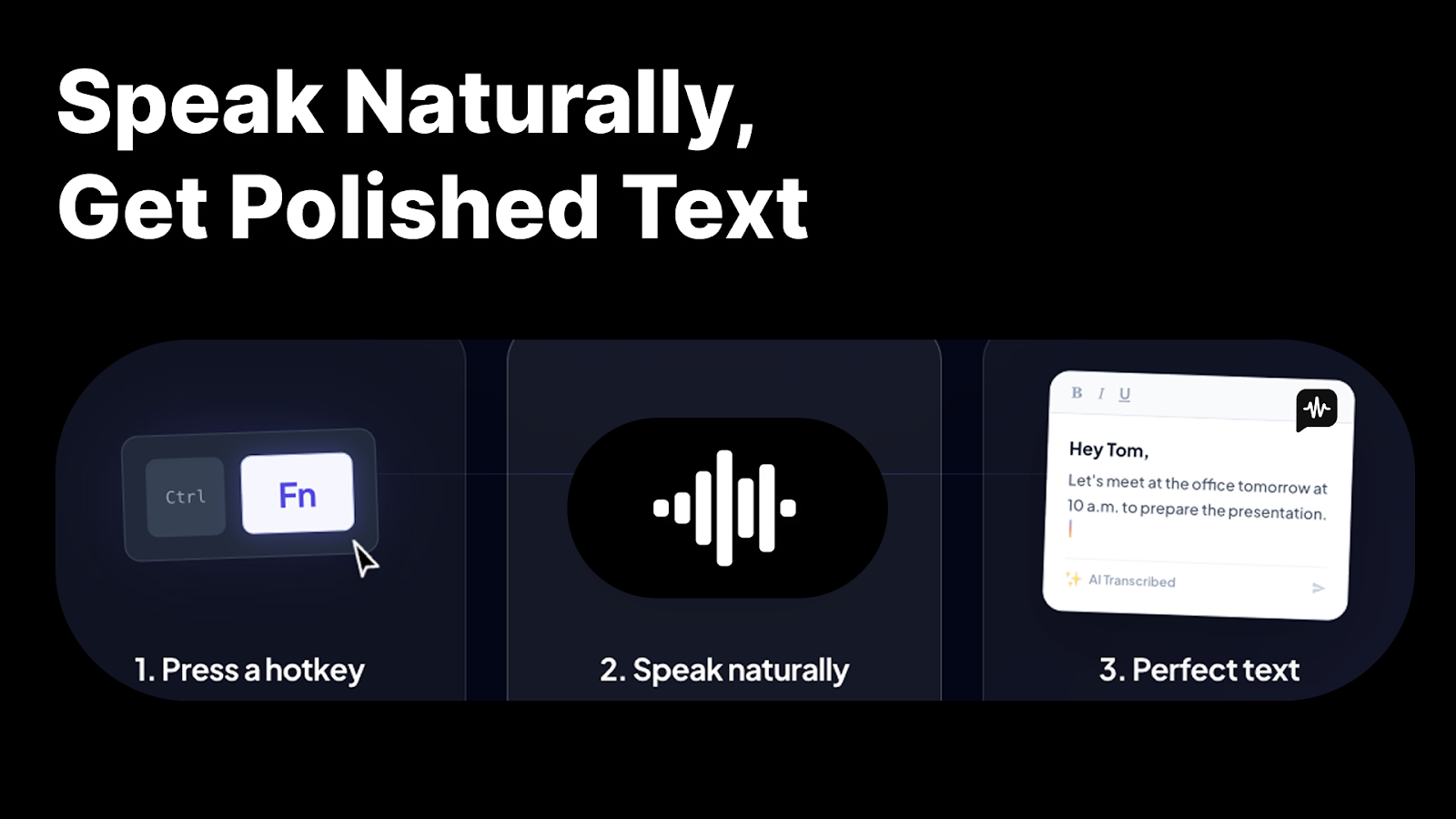 🎤 Screenshot 1 — Voice to Polished Text, InstantlyThis is the core Blip AI experience. The interface is minimal by design — you are not really meant to spend time looking at Blip’s interface at all. You press the Fn key (or your custom shortcut), a small recording indicator appears, you speak naturally, and when you release the key, polished text arrives directly in whatever application has focus. No window switching. No paste command. The AI processing happens in under a second. What you spoke — including the false starts, the filler words, the wandering sentence — arrives as clear, punctuated, structured prose that reads like you wrote it carefully. This is the first thing every reviewer notices: the output quality is markedly better than anything you would get from basic dictation, without any manual editing required. | 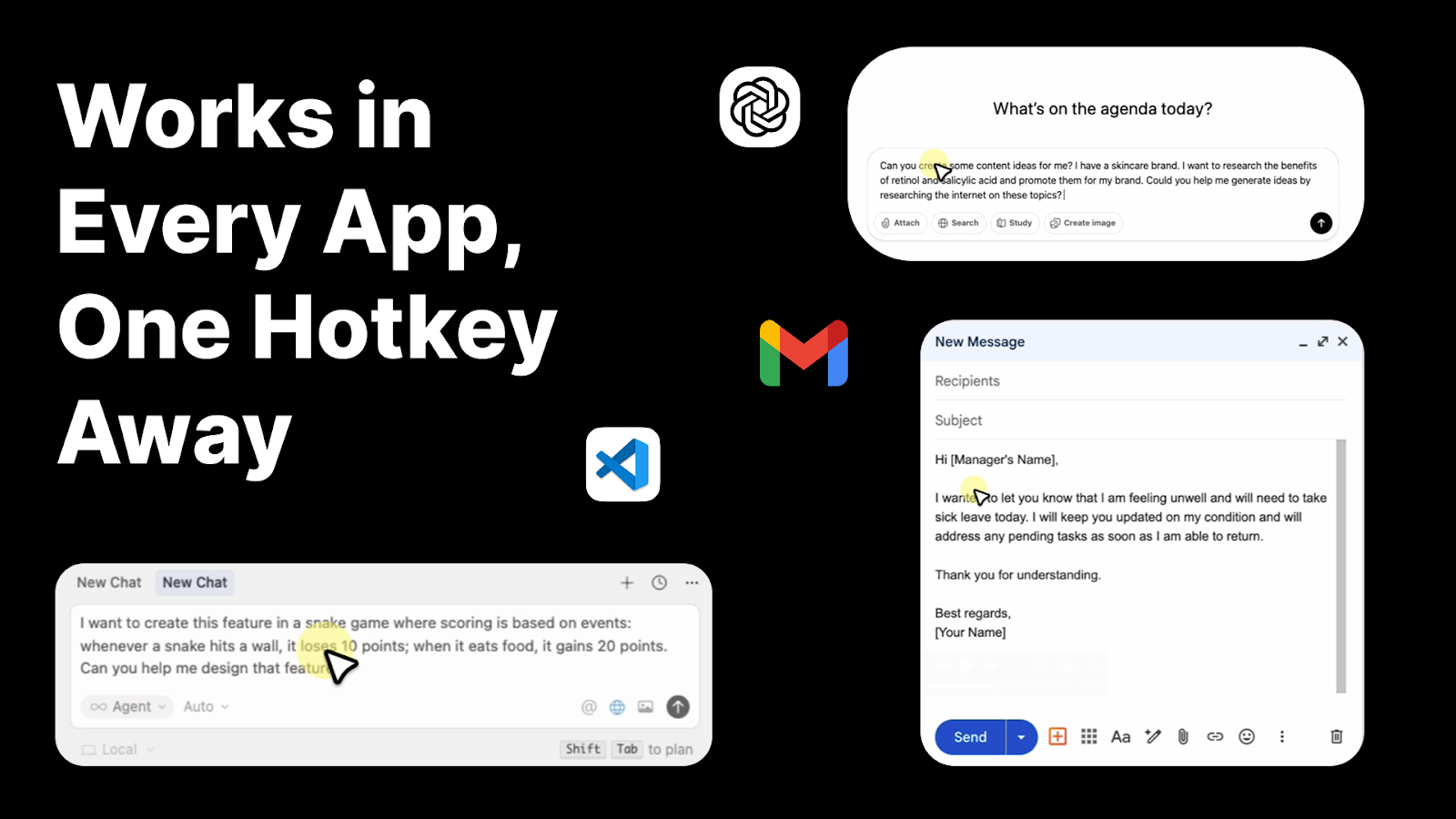 ⌨️ Screenshot 2 — One Hotkey. Every App.This is what makes Blip AI different from transcription tools like Otter.ai or even Apple’s dictation: it works inside the app you are already in, not as a separate destination. The same Fn key press that dictates into Gmail also works in VS Code for code comments, in ChatGPT for complex prompt construction, in Slack for team messages, in WhatsApp Web for personal messages, and in Google Docs for document drafting. The text injection is direct — no clipboard involved, no context switching. For developers using Cursor or Windsurf AI coding tools, this is particularly significant: speaking detailed prompts rather than typing them changes both the speed and the quality of the instructions you give to AI coding assistants. |
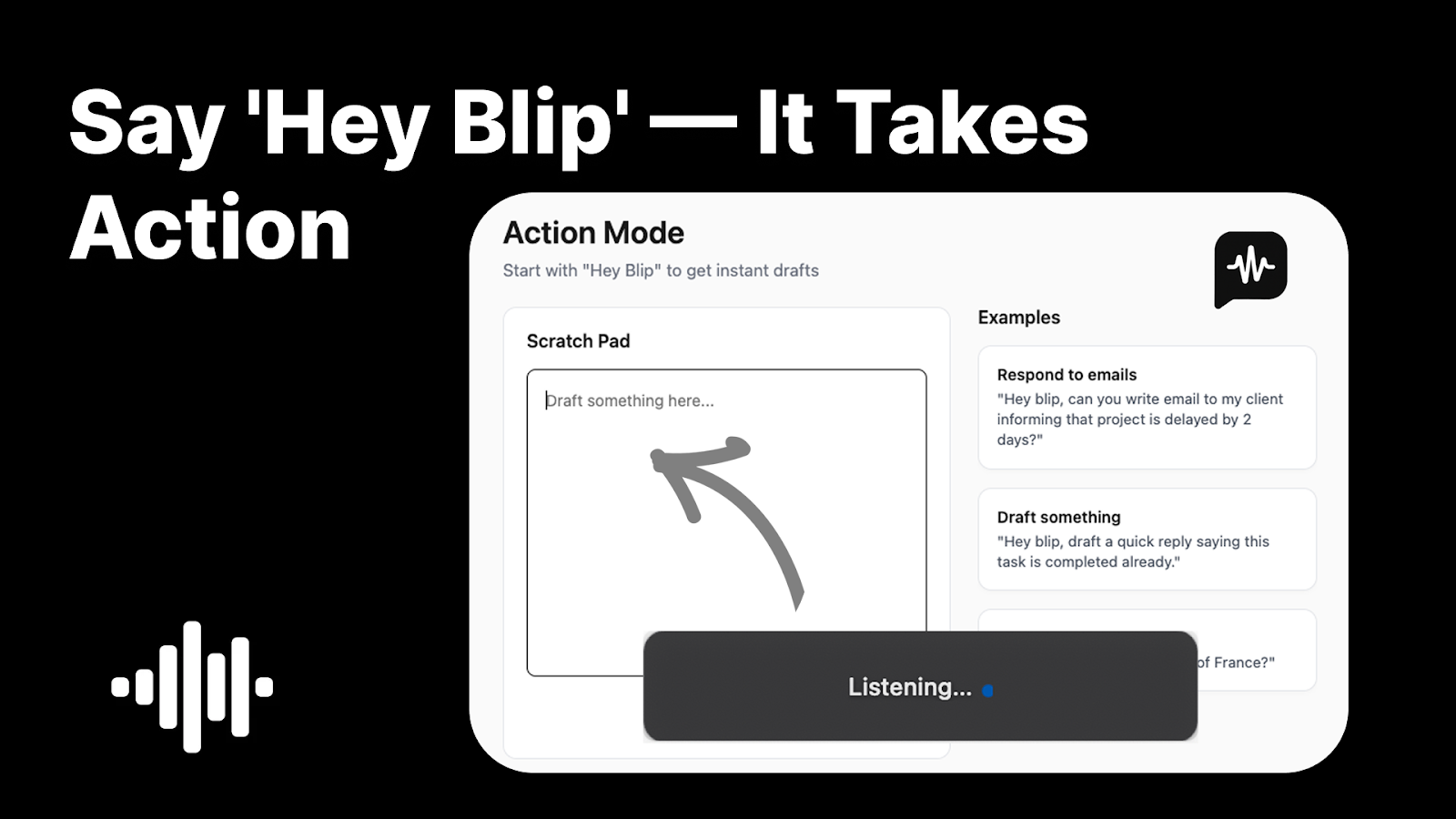 🤖 Screenshot 3 — Hey Blip: The Action ModeAction mode is the feature that moves Blip AI from dictation tool to AI writing assistant. Hold the Fn key and begin with “Hey Blip,” followed by a natural language instruction. The system understands intent and generates a complete, formatted output — not a transcription of your instruction. “Hey Blip, draft a follow-up to my client thanking her for the meeting” produces a full, professional email. “Hey Blip, write a quick Slack update saying we’re connecting tomorrow to discuss the project” produces a brief, appropriate Slack message. For developers: “Hey Blip, write a prompt for Cursor to refactor this function, add error handling and unit tests” produces a detailed, structured AI prompt. The output arrives at your cursor in the app you are currently in, ready to review and send. | 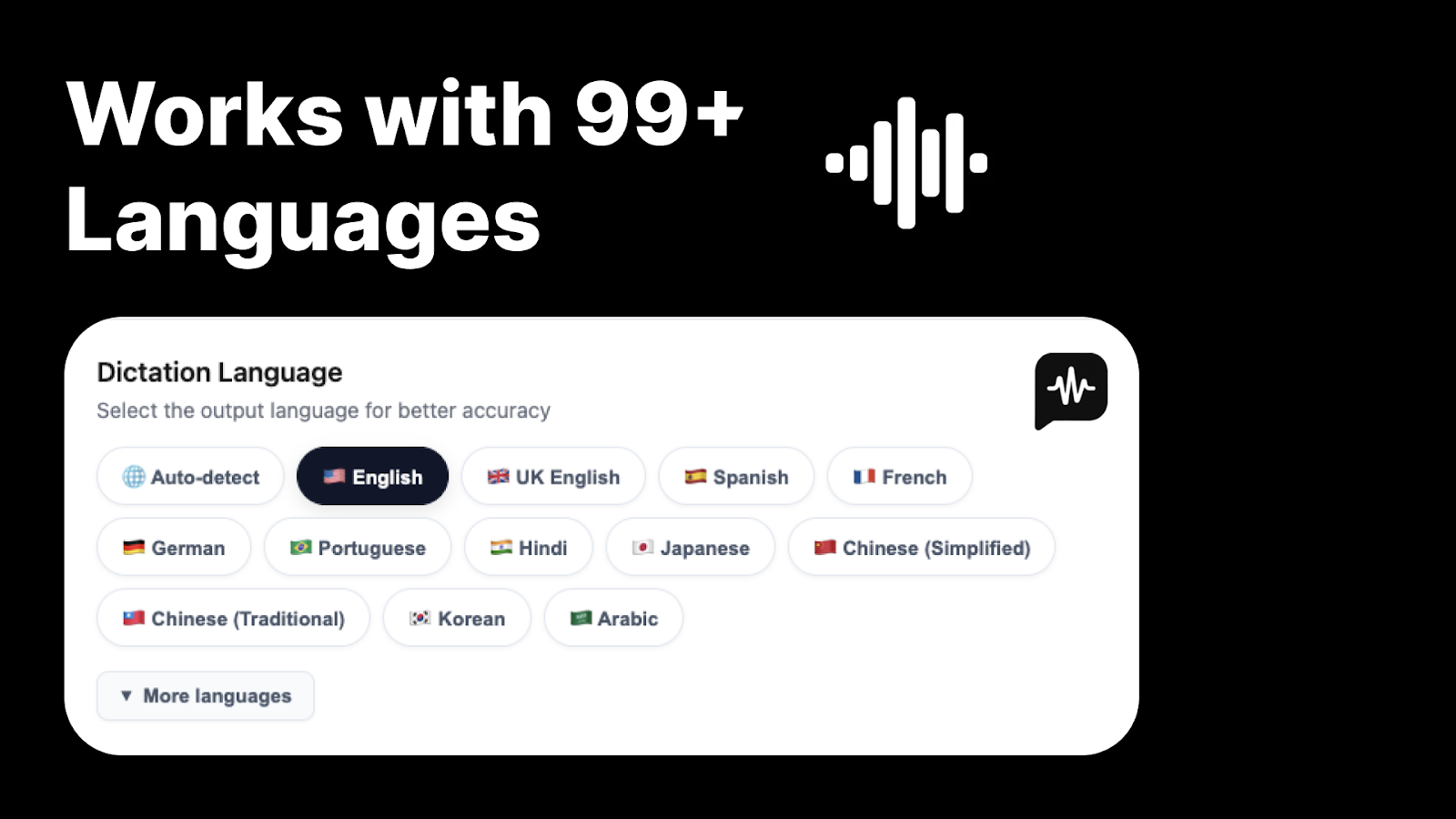 🌍 Screenshot 4 — 99+ Languages, Auto-DetectedThe language interface shows Blip’s multilingual capability: 99+ languages supported with automatic detection — you do not need to switch modes or settings when you switch languages. Blip identifies your spoken language in real time and processes accordingly. For multilingual professionals — people who work in English but communicate personally in Arabic, Hindi, Portuguese, or any of the other supported languages — this removes a constant friction point. The system adapts to your accent and speaking style over time. Minor accuracy variations exist for less common languages, which is worth testing within the 60-day window if you primarily work in a non-English language. For English and major world languages, the accuracy is consistently reported as excellent. |
⚙️ Key Features – Full Breakdown
| ⌨️ Hotkey Dictation — Works in Every App The core mechanic is elegantly simple: press Fn (or a custom shortcut), speak, release. Text appears at your cursor position in whatever app is currently active. No app switching. No clipboard. No “click to dictate” window. This works in Gmail, Slack, WhatsApp Web, Notion, Google Docs, Microsoft Word, ChatGPT, Claude, Cursor, VS Code, Windsurf, Discord, and essentially any application where you can place a text cursor. It supports standard keyboards, headphones, AirPods, and Bluetooth headsets. The setup requires no training period — press the hotkey and speak from the first second. For users who previously used tools that required switching to a transcription window, copying the output, switching back to their app, and pasting — Blip eliminates every one of those steps. | 🤖 Hey Blip Action Mode — AI Writing by Command Hold the Fn key and begin with “Hey Blip,” followed by a natural language instruction. Blip AI drafts the complete output — not a transcription of what you said, but a fully formed message, email, or prompt based on your intent. The system understands context and tone: casual instructions produce casual outputs, formal requests produce formal outputs. Custom keyword mapping extends this further — assign a short voice trigger to any long text block (a disclaimer, an email signature, a standard response), and Blip drops it at your cursor on command. For developers, the ability to dictate detailed AI prompts verbally — instead of laboriously typing them — produces richer context and therefore better AI code generation responses. |
| ✨ AI Polish — Filler Removal, Grammar & Tone Blip’s AI processing layer handles four things simultaneously as it processes your speech. First: filler word removal. Every “um,” “uh,” “like,” and “you know” is stripped before the text arrives. Second: grammar and punctuation correction, applied automatically without you saying “comma” or “period.” Third: self-correction mid-sentence — if you change your mind and restart a thought, only your final intended meaning makes it through. Fourth: context-aware tone adjustment — Blip detects the app you are in and calibrates the output’s register accordingly, brief for messaging apps, structured for email, detailed for documentation. The result is text that reads as if you wrote it carefully, generated from speech that sounded like you were thinking out loud. | 🔒 Privacy-First & HIPAA-Compliant Blip AI only activates when you hold the hotkey — it is never passively listening. Audio is processed on secure cloud servers using encrypted connections and recordings are not permanently stored after transcription. The platform is HIPAA-compliant, making it suitable for medical professionals dictating patient notes, legal professionals drafting communications about sensitive matters, and any professional who handles confidential information. For enterprise users, this privacy architecture removes the primary concern with voice tools in professional environments. Your text content is also not retained — Blip processes and discards, rather than storing a history of what you have dictated. |
| 🌍 99+ Languages + Custom Keywords + Snippet Library Blip automatically detects your spoken language from 99+ supported options — no manual switching between language modes. The custom keyword feature lets you add industry-specific terms, product names, and acronyms that standard dictation misrecognizes, training Blip to accurately transcribe your specific vocabulary. The snippet library maps short voice triggers to long text blocks: say your trigger phrase and Blip drops a complete formatted block — an email signature, a legal disclaimer, a standard client onboarding message, a commonly used code comment — directly at your cursor. Over time these custom mappings transform Blip from a general transcription tool into a system personalized to your exact workflow and vocabulary. | |
👥 Who Gets the Most Out of Blip AI?
| 👨💻 Developers & AI Power Users This may be Blip AI’s highest-value use case in 2026. Developers using AI coding tools (Cursor, Windsurf, GitHub Copilot) spend significant time typing long, detailed prompts. The richer the context you give an AI coding assistant, the better the output — but typing 200-word prompts multiple times per hour is slow and interrupts flow. Speaking those prompts via Blip takes 30 seconds instead of 3 minutes and produces better context because you think differently when you talk versus type. One verified user described it as changing how they “vibe code” entirely. The same principle applies to ChatGPT and Claude users who construct complex research or writing prompts. | 📧 Remote Workers & Professionals With Heavy Inboxes If your workday involves responding to emails, Slack messages, and meeting notes — and you are doing this by typing — you are trading time for keystrokes that Blip can handle faster and at equivalent or higher quality. One Trustpilot reviewer described the shift from copying and pasting between a dictation website and their email to using Blip’s direct hotkey injection as a meaningful daily improvement: “I know it sounds sad, but the switching between apps and cutting and pasting was a pain.” For a remote worker managing 50–100 messages per day, that friction compounds into real hours per week. |
| 🏥 Healthcare & Legal Professionals HIPAA compliance and the no-stored-transcriptions privacy model make Blip AI practical for professionals who were previously barred from using voice tools with sensitive information. Medical professionals dictating notes directly into electronic health record systems, lawyers drafting client communications, and consultants working with confidential data can use Blip without the privacy risk that prevented them from adopting other voice tools. The multi-language support also serves multilingual healthcare environments where both English and other languages are used in clinical documentation. | ⚠️ Who Should Think Carefully Users who primarily work on mobile devices should wait for the iOS and Android apps, which are in development but not yet fully available. The current experience is desktop-first. Action Mode (Hey Blip) has a learning curve — some users initially report the voice command not triggering as expected, requiring some practice to establish the activation pattern. If your work is primarily in one non-English language, test accuracy carefully within the 60-day window. And users in consistently noisy environments should budget for a decent directional microphone, as background noise affects transcription quality in any voice tool. |
🆚 Blip AI vs Wispr Flow vs Dragon vs Mac Dictation
| Feature | Blip AI (LTD) | Wispr Flow | Dragon Dictate | Mac Dictation |
|---|---|---|---|---|
| Pricing | Lifetime Deal ✅ | $12/mo ($144/yr) | $15+/mo | Free (built-in) |
| Text Injected at Cursor | ✅ Yes 🏆 | ✅ Yes | ✅ Yes | ✅ Yes |
| Filler Word Removal | ✅ Auto 🏆 | ✅ Yes | ❌ No | ❌ No |
| Hey Blip / AI Action Mode | ✅ Yes 🏆 | ❌ No | ❌ No | ❌ No |
| Context-Aware Tone | ✅ Yes 🏆 | ⚠️ Limited | ❌ No | ❌ No |
| Languages Supported | 99+ Auto 🏆 | Multiple | Multiple | Multiple |
| HIPAA Compliant | ✅ Yes 🏆 | ⚠️ Check policy | ✅ Yes | ❌ No |
| Custom Keywords & Snippets | ✅ Yes 🏆 | ⚠️ Limited | ✅ Advanced | ❌ No |
| Works in VS Code / Cursor | ✅ Yes 🏆 | ✅ Yes | ✅ Yes | ❌ No |
| No Stored Transcriptions | ✅ Yes 🏆 | ⚠️ Check policy | ❌ Local stored | ✅ Local only |
🔍 The Honest Look: What to Know Before Buying
A perfect 5.0/5 from 30 AppSumo reviews is impressive. However, it is still a small review base for a product. The reviews are also recent. This suggests Blip AI is still early in its AppSumo Launchpad journey. Here is what the feedback shows. It highlights where the product is truly excellent. It also shows where it is still developing.
The core dictation workflow is excellent. The feedback from real users on the fundamental experience — press hotkey, speak, get polished text — is consistently enthusiastic. The filler-word removal works. The grammar correction is good. The cross-app injection is genuinely seamless. This is not a product that overpromises on its core use case. It delivers.
Action Mode needs some calibration. Several users in the AppSumo questions section report that “Hey Blip” does not trigger reliably at first. This appears to be partly about pronunciation, partly about the timing of the phrase at the start of dictation, and partly about learning the right tone of command versus conversational dictation. The team is actively responding to these questions and improving the feature, but expect a short learning curve before Hey Blip clicks into consistent use.
Mobile is coming, but it is not here yet. The AppSumo listing mentions iOS is coming soon, and the team recently upgraded device limits across all tiers in response to buyer feedback. The mobile experience is under active development. If you primarily need voice dictation on your phone, this is a desktop-first product for now.
The team is responsive and moving fast. This matters for a Launchpad product. The team responded to device limit requests by increasing limits across all tiers and automatically applying the upgrades to existing customers without requiring any action. That pattern of listening, acting, and communicating is exactly what you want to see from a young product on AppSumo.
🎁 New to AppSumo? Get 10% Off Your First Purchase!
Sign up with a new email → get 10% discount on any lifetime deal.
Thousands of tools from $19 once.
🛍️ Sign Up & Get 10% Off AppSumo →
✅ New accounts only | ✅ Instant discount | ✅ Lifetime access
✅ Blip AI – Honest Pros and Cons
✅ What Works Really Well
| ⚠️ Honest Limitations
|
💬 What Verified Buyers Are Saying
| ⭐⭐⭐⭐⭐ Verified AppSumo Buyer — Developer “Blip AI has completely changed how I vibe code. I can dictate big prompts while thinking. It’s a game changer.” |
| ⭐⭐⭐⭐⭐ Trustpilot Reviewer — Switched from Letterly “With a quick FN/hotkey I can pull up the app, record, and it pastes the text directly into where I was. I love it. The switching between apps and cutting and pasting was a pain. I’ve also played around with the Hey Blip context — just clicking the Fn/hotkey and saying ‘hey blip, create an email saying let’s get together for lunch sometime next week’ is also awesome.” |
| ⭐⭐⭐⭐⭐ AppSumo — Praised for Speed & Cross-Platform “Blip AI has been praised for its impressive speed, accurate transcription, and seamless cross-platform integration.” |
| ⭐⭐⭐⭐⭐ Team Response — Device Limits Upgraded “We’ve increased the device limits across all license tiers! Whether you’re switching between your work laptop, personal machine, and phone — or equipping a small team — you now have more room to blip freely. Existing customers will automatically receive the updated limits. No action needed on your end.” |
⭐ Our Blip AI Rating Breakdown
| ⌨️ Hotkey Dictation Speed & Accuracy | 9.5 / 10 |
| ✨ Filler-Word Removal & AI Polish | 9.4 / 10 |
| 🤖 Hey Blip Action Mode (when working) | 8.8 / 10 |
| 🌍 Multi-Language Support | 8.5 / 10 |
| 🔒 Privacy Architecture (HIPAA) | 9.6 / 10 |
| 📱 Mobile App Availability | 6.0 / 10 |
| 🛠️ Team Responsiveness & Roadmap | 9.3 / 10 |
| 💰 Value vs Wispr Flow / Dragon Subscription | 9.7 / 10 |
| ⭐ Overall | 4.8 / 5.0 ★★★★★ |
💬 My Personal Take: Is Blip AI Worth It in 2026?
The category Blip AI competes in is system-wide voice dictation with AI polish. It is still underused, even though it saves a lot of time. Many knowledge workers could benefit from voice dictation. But most have not tried it beyond their device’s default dictation. That default is often inaccurate and full of filler words.
Built-in dictation failed for most people because it had too much friction. You had to speak like a robot. You had to say “period” out loud. You had to remove “ums” later. You also had to deal with frequent recognition errors. That bad experience turned people away from the category. Blip AI aims to remove those pain points. It removes filler words automatically. It smartly adds punctuation. It also puts the text at your cursor without extra steps.
Hey Blip Action Mode is what sets it apart from other voice-to-text tools. Most dictation tools only transcribe. Blip AI also takes action. There is a big difference between word-for-word dictation and a command. For example, you can say, “Hey Blip, reply to John.”You can add, “Say I’ll have the report ready by Thursday.”You can also say, “Keep it professional.”That turns your voice into an AI writing assistant. It is not just a keyboard replacement. The learning curve is real, but it is short. Once it clicks, it can change how people write at work.
Here are the honest reservations. This is a Launchpad product with 30 reviews. That means the review base is small. It also means the product is still early. Mobile is not ready yet. Action Mode takes some practice. But the team is active and responsive. They are already updating based on buyer feedback. That matters most at this stage.
If you write long AI prompts, it is worth a real test. If you manage email or Slack every day, it is worth testing too. If you work remotely, you may also benefit. It helps when you face a blank reply box. It lets you say the response out loud. Blip AI is worth testing during the 60-day window. The pricing also makes the decision easier. Wispr Flow costs $144 per year, forever. Blip AI is a one-time payment with no future charges.
Bottom line: Blip AI does what it promises. It does it well. The price removes subscription math for good. The 5.0/5 rating shows real users are truly satisfied. Get it and use it for two weeks in your real workflow. You will quickly know if it becomes part of how you work.
🎤 Stop Typing. Start Talking.
Press Fn → Speak → Get polished text at your cursor in any app. 99+ languages. Hey Blip AI commands. HIPAA-compliant. AppSumo Launchpad.
👉 View Blip AI Lifetime Deal on AppSumo → Get 10% Off New Email Signup
AppSumo Launchpad | One-Time Payment | 60-Day Money-Back Guarantee
📚 Related Articles
🔗 Unmixr AI Review 2026 — Best AI Voice & Dubbing Tool on AppSumo
🔗 Writeseed Review 2026 — AI Content Writer With GPT-5 & Claude 4
🔗 10 Best AppSumo Deals 2026 — Honest Lifetime Deal Guide
❓ Frequently Asked Questions About Blip AI
What is Blip AI and what does it do?
Blip AI is an AI-powered voice dictation tool for Mac and Windows. Press the Fn hotkey, speak naturally, release — and polished text (with filler words removed, grammar corrected, tone adjusted) appears instantly at your cursor in any app. Hey Blip action mode lets you draft full emails and messages from a single natural language voice command. Supports 99+ languages, HIPAA-compliant, no stored transcriptions. AppSumo Launchpad pick. 5.0/5 from 30 verified buyers.
How does Hey Blip work?
Hold the Fn key, begin with “Hey Blip,” then give a natural language instruction — “Hey Blip, draft a follow-up email to my client thanking her for the meeting, keep it brief and warm.” Blip generates a complete, formatted output based on your intent rather than transcribing your words. Context-aware: casual for Slack, formal for email. Requires a short learning curve to trigger reliably.
Does Blip AI work in VS Code and Cursor?
Yes. Blip AI works in VS Code, Cursor, Windsurf, and other developer tools. For developers using AI coding assistants, speaking detailed prompts rather than typing them produces richer context and faster workflow. Blip injects text directly at the cursor with no copy-paste required.
Is Blip AI available on mobile?
The primary experience is desktop — macOS and Windows. iOS is coming soon and Android is in active development. The team has been responsive to mobile requests. If mobile dictation is your primary use case, check back for updates or use the 60-day AppSumo window after purchasing to confirm mobile availability.
Is Blip AI private? Does it store my recordings?
Blip AI only activates when you hold the hotkey — it is never passively listening. Audio is processed on secure encrypted servers and recordings are not permanently stored after transcription. The platform is HIPAA-compliant, making it suitable for medical, legal, and other sensitive professional environments.
How does Blip AI compare to Wispr Flow?
Wispr Flow charges $144/year recurring. Blip AI is a one-time lifetime deal. Feature comparison: Blip AI includes Hey Blip action mode for AI-drafted messages (Wispr Flow lacks this), works in VS Code and developer tools, supports 99+ languages with auto-detection, and offers HIPAA compliance. Wispr Flow has a longer track record. For the core dictation workflow and the action mode capability at lifetime pricing, Blip AI is the stronger value.

Hi, I’m Arif Molla – founder of Lifetime Deal Tech, your trusted source for the best software lifetime deals, honest reviews, and money-saving guides.
I help bloggers, freelancers, and solopreneurs discover one-time SaaS deals that save thousands of dollars in subscription costs. I personally test and review every tool before recommending it.
Follow me for the latest lifetime deals, SaaS reviews, and smart buying guides.